The increasing use of Visio for facilities management at Chase Manhattan Bank is a success story that has been evolving over several years. The challenge for the dealing room support department has been to maintain continuity of service while efficiently and speedily effecting changes to service, equipment and location. The solution provided by bVisual Ltd has now crossed the Atlantic from London to New York, and there are plans for it to reach the Far East by the end of the year.

bVisual and others have created a database and linked graphics system that helps Chase Manhattan Bank manage the complex and ever-changing desk and equipment layouts in their dealing rooms and offices. The system, named CID (Chase Integrated Database), deployed in both London and New York has grown from being a project tool that helped in managing the physical moves arising out of the merger with Chemical Bank, into an enterprise management tool that supports the day-to-day business within the bank’s offices.
The system now comprises a Sybase database with an explorer type interface for data viewing and manipulation, and Visio for the visualization of floor layouts, desks and computer rooms. This case study is about the Visio part of the system.
The database holds details of all desks, their occupants, equipment and services, and is used for planning people, equipment and service moves and changes, both from desk-to-desk and from user-to-user. Once a planned move or change is executed, the database is automatically updated ensuring an accurate configuration record is maintained. These dealing rooms are in a constant state of flux, with personnel moving around on a regular basis. The support services provided to the dealing rooms are given the highest priority, because a dealer has to be kept dealing at all costs. The dealers work at desks that are seemingly overloaded with the latest technology, with many screens and systems for interacting with different financial markets all over the world. Individual dealers depend upon their equipment working constantly, and they become used to a particular layout of their environment. The Visio-based application provided by bVisual is an essential element of the support system.
Early Days with Visio 4.1 and MS Access
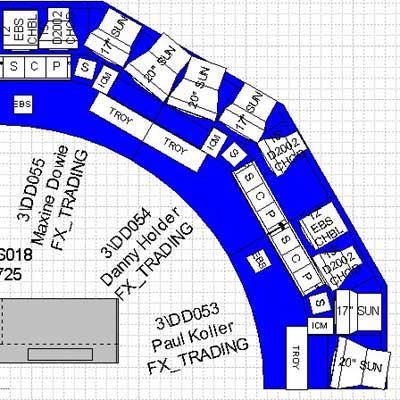
When it was necessary to relocate several hundred city-traders from one building to another, it was decided to use Visio Technical 4.1 to provide semi-automated desktop equipment layouts for the dealer’s new desks. Each dealer was presented with a dimensionally accurate drawing of their new desk along with its immediate neighbors as some services are shared. The dealer was able to see what the new desk was going to look like, and the installers had an accurate layout to work from. This was especially important as the dealing desks were also changing from normal rectangular layouts to arced work-surfaces arranged as a semi-circle. Moves on this scale require a lot of planning, and there are always changes of requirements and staff movements to take into account. The move was effected over one weekend, due in part to the accuracy of the information provided.
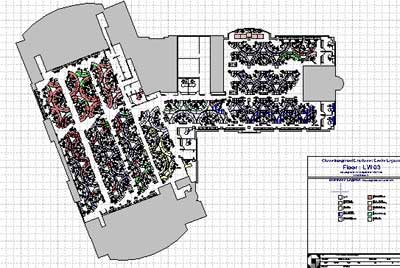
Large scale floor layouts (A0 – 1:100) were produced with custom made desk shapes that used the Visio Database Wizard to link to an intermediary Microsoft Access database. These desk SmartShapes could be refreshed slowly with the latest up-to-date information from the database, taking up to an hour for the largest drawings.
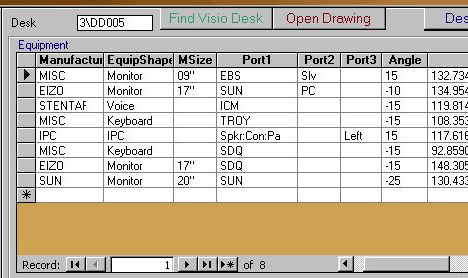
In addition, MS Access was used to semi-automatically layout equipment on to smaller scale (A3 – 1:10) desk drawings. Only a few SmartShapes were created for this task, but they were accurate to within half an inch.
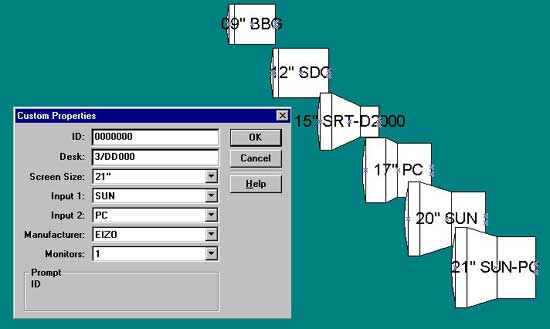
Details of all possible equipment types, such as monitors, speakers and keyboards, that had a physical presence on the desktop were gathered, and Visio SmartShapes produced. The use of Visio SmartShape for technology enables more efficient planning of the desktops. In a traditional CAD system, each different size of monitor would have to be a different symbol, so, if you wanted to change a 21” screen for 15” then you would need to delete the original symbol and place down a new symbol at the desired location and rotation. bVisual built a monitor shape that handles all different dimensions by simply changing a custom property on the SmartShape. The monitor graphics then change automatically to represent the desired size.
And then Visio got VBA…
The introduction of VBA into Visio enabled bVisual to migrate their code from Access into the Visio stencils. This also allowed the intermediary Access database to be dropped, and ODBC connections direct to the Sybase database were established. It took a while to find suitable ODBC drivers to use, as Chase Manhattan Bank were also gradually upgrading from NT 3.5 to NT 4, but in the end, performance was speeded up sixty fold. Drawing updates that took an hour, now take a minute. bVisual still build SmartShapes that are compatible with the Database Wizard, but use their own VBA code to perform similar updates in a fraction of the time.
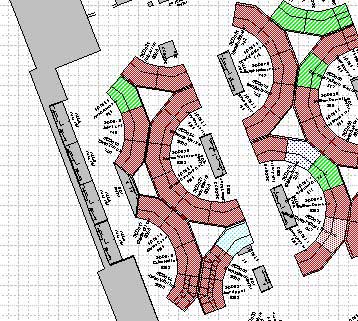
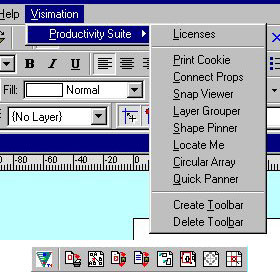
bVisual started to produce add-ons for the Visio environment to help with the updating, labeling, coloring and printing of drawings of all scales and sizes. These add-ons are grouped into suites on Visio stencils that contain both graphics and code. Thus the code is modular and distributable, since no code is held within the drawings. For use at Chase Manhattan Bank, they produced two add-ons called Productivity Suite and Desk Analyser Suite. These suites nestle themselves into the Visio menu and toolbar structure, allowing the end user easy access to the applications contained within them.
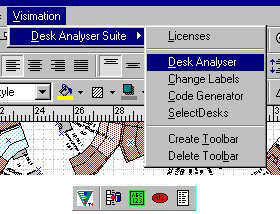
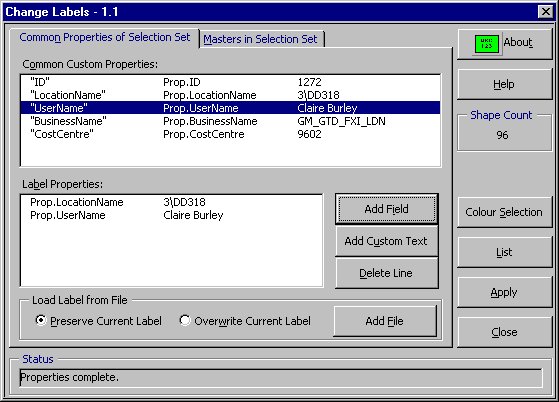
The Desk Analyser Suite provides the ability to refresh all of the desk SmartShapes on the floor layouts with either the current data, or data based on a snap-shot at any time in the past or future (if a move is being planned, for example). Once the information is loaded into the shapes, then the displayed data on each shape can be varied to suit the user’s requirements. In addition, the desk shapes can be selected, colours and patterns changed or extra text added, from any correctly formed text file. This function is often used to highlight desks with particular types of equipment or service. Almost as an aside, the selected properties of the highlighted shapes can be sent to the clipboard, so that they can be used in a report, spreadsheet or even as a legend on the drawing itself.
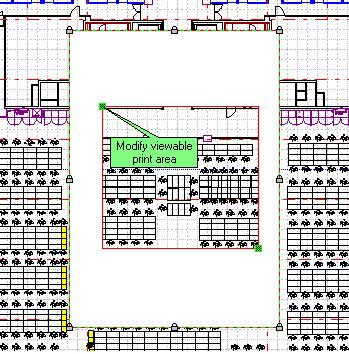
Visio does not currently support the printing of selected areas within a drawing, so bVisual had to write a small application to enable this, since it is often requested in use. This enables the user to define a rectangular area anywhere on a drawing to be printed, along with the desired output scale and the printer page size. A print mask is automatically overlaid on the drawing, on to which any other text and graphics can be added. Finally, the user can print, at which point the application automatically adjusts the page’s size and scale to fit the mask.
The Desk Analyser Suite has several other functions too. It checks the desks on the drawings against the database, and vice-versa; an essential maintenance tool when most moves and changes are actually performed in the explorer interface into the database, rather than on the drawings. Often, the base structure and furniture layouts are received from other CAD systems, usually in Autocad/ Intellicad format. The DWG/DXF import routines in Visio Technical have proved useful, though the external drawings are normally too dense for everyday facilities management use, so the team simplifies them without losing their dimensional accuracy, creating a more suitable backdrop for the intelligent desk layouts.
The Future
bVisual are continually improving the service that they offer to clients like Chase Manhattan Bank, and shall be further improving the automated desktop equipment layout application. This will increase the accuracy of the drawings and information produced by the technology planners, and will speed up their productivity. They are also developing computer room cabinet elevations as an enhancement to the Visio Network Equipment shapes.
bVisual have also prototyped Intranet viewing and printing of the drawings, and are considering its suitability for a wider audience within the bank. bVisual have also recently enhanced the organisation chart capabilities in Visio to provide better integration with the data store. This will provide more accurate representation of the structure of an organisation, and highlight any inaccuracies.

Mike Nichols, project manager responsible for the detailed planning that supported Chase Manhattan’s 1996 trading floor relocation recently reflected “I knew we had achieved something significant when, after the dealers had reviewed their newly built desks, it became essential to make even minor amendments to the layout drawings…The dealers would move a keyboard three inches to the right and, if the drawings were not amended and republished, the contractors would dutifully move it back again. The only real mistake we made was that the desk-top layout drawings didn’t show the location of the coffee machines and one senior dealer threw a mighty wobbly when he discovered he was sitting right next to the coffee point!!”
The future at Chase Manhattan Bank is now more visible with the Visio solutions provided by nBisual ltd